Why I Built django-nepkit
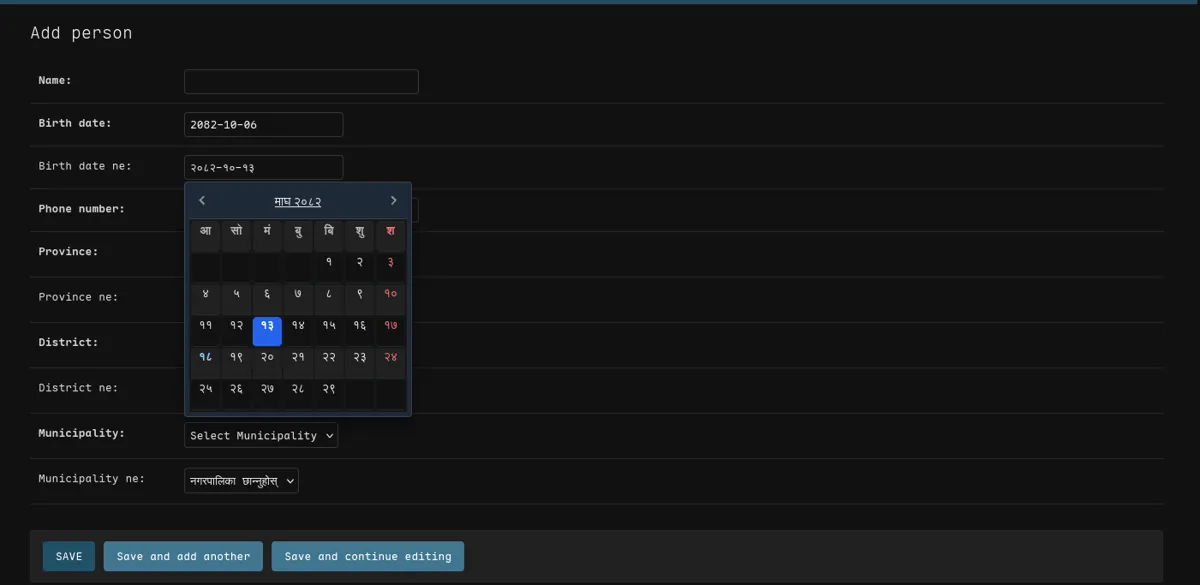
Building software for Nepal comes with unique challenges that most Django packages don’t address. After a year of copying the same code across projects, I decided to build django-nepkit, a toolkit that ends the copy-paste.
The Problem: Copy Paste Hell
Every time I started a new Django project for a Nepali client, I found myself copying the same chunks of code:
- BS Date Fields: Converting between AD and BS dates manually, writing custom model fields, and dealing with timezone quirks
- Location Hierarchies: Hardcoding Province → District → Municipality relationships, rebuilding cascading dropdowns from scratch
- Phone Validation: Writing regex patterns for NTC, Ncell, and other carriers over and over again
- Admin Integration: Fighting with Django’s admin to display BS dates properly, manually adding datepicker widgets
- Currency Formatting: Implementing Lakhs/Crores comma placement (not the Western thousands separator)
Every project reinvented the wheel differently. One project stored BS dates as strings, another tried converting on the fly during queries (slow), and yet another gave up and just used AD dates with manual conversions in views.
The Breaking Point
I was working on an NGO project and a school management system that both required handling Nepali specific data:
- BS date fields with a beautiful datepicker in the admin
- Province/District/Municipality chaining forms
- Phone number validation for multiple carriers
- DRF API endpoints with BS date filtering
- Currency display in Nepali format (Rs. 1,12,34,567.00)
I realized I was spending more time building infrastructure than solving the actual business problem. So I built a package.
The Solution: django-nepkit
I built django-nepkit with three core principles:
1. Zero Configuration
Just add it to INSTALLED_APPS and start using it:
from django_nepkit import NepaliDateField, ProvinceField, DistrictField

class Profile(models.Model):
    birth_date = NepaliDateField()  # BS date with auto datepicker in admin
    province = ProvinceField()       # Auto populated with official data
district = DistrictField() # Automatically chains with provinceNo migrations to run, no static files to configure, no JavaScript to include manually. It just works.
2. Database Storage That Makes Sense
The biggest challenge was BS date storage. I tried several approaches:
-
Approach 1: Store as AD date, convert to BS on display
- Problem: Slow queries, conversion errors during filtering/sorting
-
Approach 2: Store as timestamp
- Problem: Timezone hell, off by one errors with lunar calendar
-
Final Solution: Store as
VARCHAR(10)inYYYY-MM-DDformat- Why?: String sorting matches chronological order, database indexing works perfectly, no timezone issues, BS date is the source of truth
# In the database: "2081-10-15" (stored as string)
# In Python: nepalidate(2081, 10, 15) (rich object with methods)
# In admin: Beautiful datepicker with Devanagari support3. Production Features
Features that projects actually need:
Admin Integration:
from django_nepkit import NepaliModelAdmin, NepaliDateFilter

@admin.register(Profile)
class ProfileAdmin(NepaliModelAdmin):
    list_display = ("name", "birth_date", "phone")
    list_filter = (("birth_date", NepaliDateFilter),)
# Automatic datepicker, BS date display, and filtering!Address Chaining:
# Client-side chaining (zero config)
province = ProvinceField()
district = DistrictField()
municipality = MunicipalityField()

# Server-side with HTMX (for better UX)
province = ProvinceField(htmx=True)
district = DistrictField(htmx=True)API Support:
from django_nepkit.filters import NepaliDateYearFilter

class ProfileFilter(filters.FilterSet):
    # Filter by BS Year: /api/profiles/?year=2081
year = NepaliDateYearFilter(field_name="birth_date")Address Normalization (my favorite feature):
from django_nepkit.utils import normalize_address

# Turn messy user input into structured data
result = normalize_address("House 123, Bharatpur, Chitwan")
# Returns: {
#   'province': 'Bagmati Province',
#   'district': 'Chitawan',
#   'municipality': 'Bharatpur Metropolitan City'
# }

# Works in Nepali too!
result = normalize_address("विराटनगर, कोशी")What I Learned
Building this package taught me several lessons:
1. Design for Django’s Patterns
Don’t fight the framework. Use Django’s existing patterns:
CharFieldas base for BS dates (not custom database types)- Standard validators for phone numbers
- Foreign keys to location models (not hardcoded choices)
- Template tags for formatting (following Django conventions)
2. Performance Matters
Originally, I was converting AD to BS on every database query. Terrible idea. It killed performance on large datasets.
The solution? Store BS as the source of truth. Use string format that sorts correctly. Let the database do what it does best.
3. Test Everything
With 67% test coverage across:
- Model field behavior
- Admin integration
- Widget rendering
- Validators
- API serializers
- Template filters
I caught edge cases I never would have found manually:
- Null date handling
- Timezone aware timestamps with
auto_now - Form validation with multiple date formats
- Devanagari digit conversion
4. Documentation is Half the Product
I spent almost as much time on documentation as on code. The README includes:
- Quick start examples
- Common patterns
- Migration guides
- FAQ section
- Technical design explanations
Why? Because confused developers won’t use your package even if it solves their problem perfectly.
Real Impact
Since releasing django-nepkit, I’ve:
- Eliminated 500+ lines of boilerplate from my projects
- Reduced “BS date setup” from 2 hours to 2 minutes
Try It Yourself
Installation is simple:
pip install django-nepkitAdd to INSTALLED_APPS:
INSTALLED_APPS = [
    # ...
    "django_nepkit",
]Optional global configuration in settings.py:
NEPKIT = {
    "DEFAULT_LANGUAGE": "en",           # "en" or "ne"
    "ADMIN_DATEPICKER": True,           # Toggle the datepicker
    "TIME_FORMAT": 12,                  # 12 or 24 hour display
    "DATE_INPUT_FORMATS": ["%Y-%m-%d", "%d/%m/%Y", "%d-%m-%Y"],
}Start using it:
from django_nepkit import NepaliDateField, NepaliPhoneNumberField

class Profile(models.Model):
    name = models.CharField(max_length=100)
    birth_date = NepaliDateField()
phone = NepaliPhoneNumberField()That’s it. No complex configuration. No static file setup. Just install and use.
Open Source
The package is MIT licensed and available on:
- PyPI: django-nepkit
- GitHub: S4NKALP/django-nepkit
If you’re building Django apps for Nepal, give it a try. And if you find bugs or want features, contributions are welcome!
Credits
This package is built on top of these open source projects:
- nepali by @opensource-nepal - Provides the core
nepalidate,nepalidatetimeobjects and regional location data (Provinces, Districts, Municipalities) - Nepali Datepicker by Sajan Maharjan - Powers the beautiful BS date picker widget in the Django Admin
Without these libraries, django-nepkit wouldn’t exist. Huge thanks to the maintainers!
Building django-nepkit solved a problem I faced in every project. Now instead of copying code, I just pip install and move on to solving actual business problems.
If you’re constantly copying the same code across projects, maybe it’s time to turn it into a package.