Modus
Modus is a modular, extensible shell for Hyprland, built entirely with Fabric. It started as a personal experiment and grew into a collaborative project with several open source developers.
Hyprland and Wayland
Before Modus, the environment it lives in. Wayland has become the standard for Linux display servers, with smoother animations and better security than X11. Hyprland is a dynamic tiling Wayland compositor, highly customizable and fluid out of the box.
A compositor alone is not a complete desktop. You still need a shell or panel handling notifications, workspace tracking, the system tray, and quick settings. Ricing is the art of customizing your desktop to look and feel exactly how you want it, and a good shell sits at the center of that.
The Origins and Early Experiments
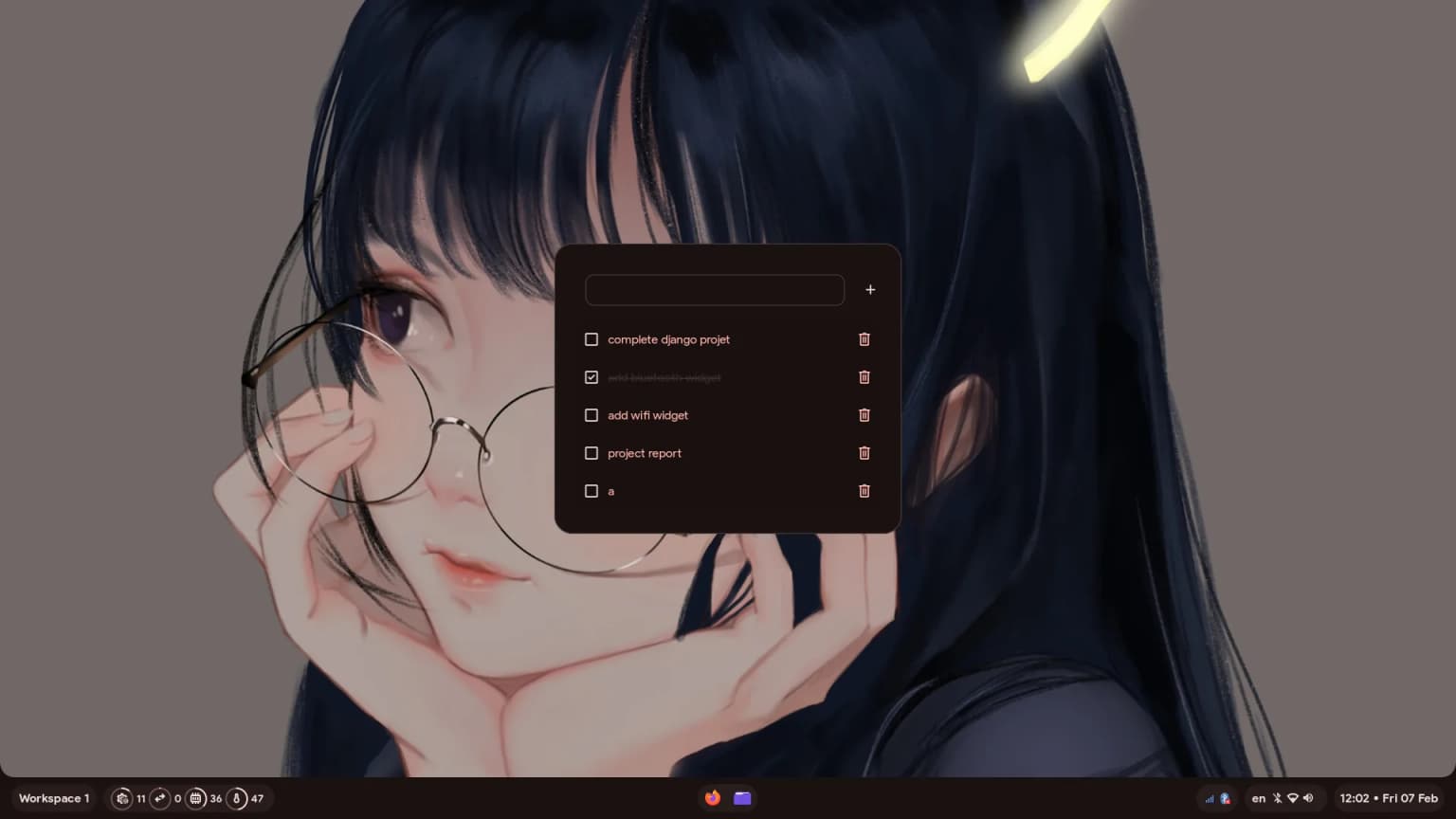
Before Modus existed, I was heavily into customizing my Wayland desktop. I daily drove a shell built with AGS from the hyprland-material-you-archive. It was a great starting point using Material You, but I always wanted to tweak further and make it my own.
During that exploration I found Fabric, which uses Python. Writing a desktop shell in Python instead of JavaScript or a lower-level language felt right, and I went deep into the Fabric docs to learn its GTK widget system.
My first goal: replicate the AGS shell I was using, built entirely in Fabric. I spent hours tweaking configurations, learning the framework’s quirks, and injecting my taste into the code. Raw and experimental, but it laid the foundation for everything after.
A Collaborator
A few months into my Fabric work, a friend named tr1xem reached out on Discord. He had questions about how Fabric worked under the hood. The quick technical chat turned into a long conversation about desktop customization and what we could build together.
At the time I was mid-rewrite of my personal shell, working on a new design inspired by Axenide’s setup. I couldn’t pin down a cohesive concept to tie the visual elements together, so I shared my progress with tr1xem and asked where to take the design.
He said he’d love a desktop environment with the polished, familiar aesthetic of macOS. That clicked. I knew E3nviction, who already had an early macOS-style setup in Fabric. I showed E3nviction’s work to tr1xem as proof of concept, and we had our vision.
After that, tr1xem became a real collaborator. He fixes bugs, builds widgets, and keeps a steady stream of ideas coming. When I’m stuck on something, he’s the one who keeps the motivation up and the project moving.
Building the macOS Vision
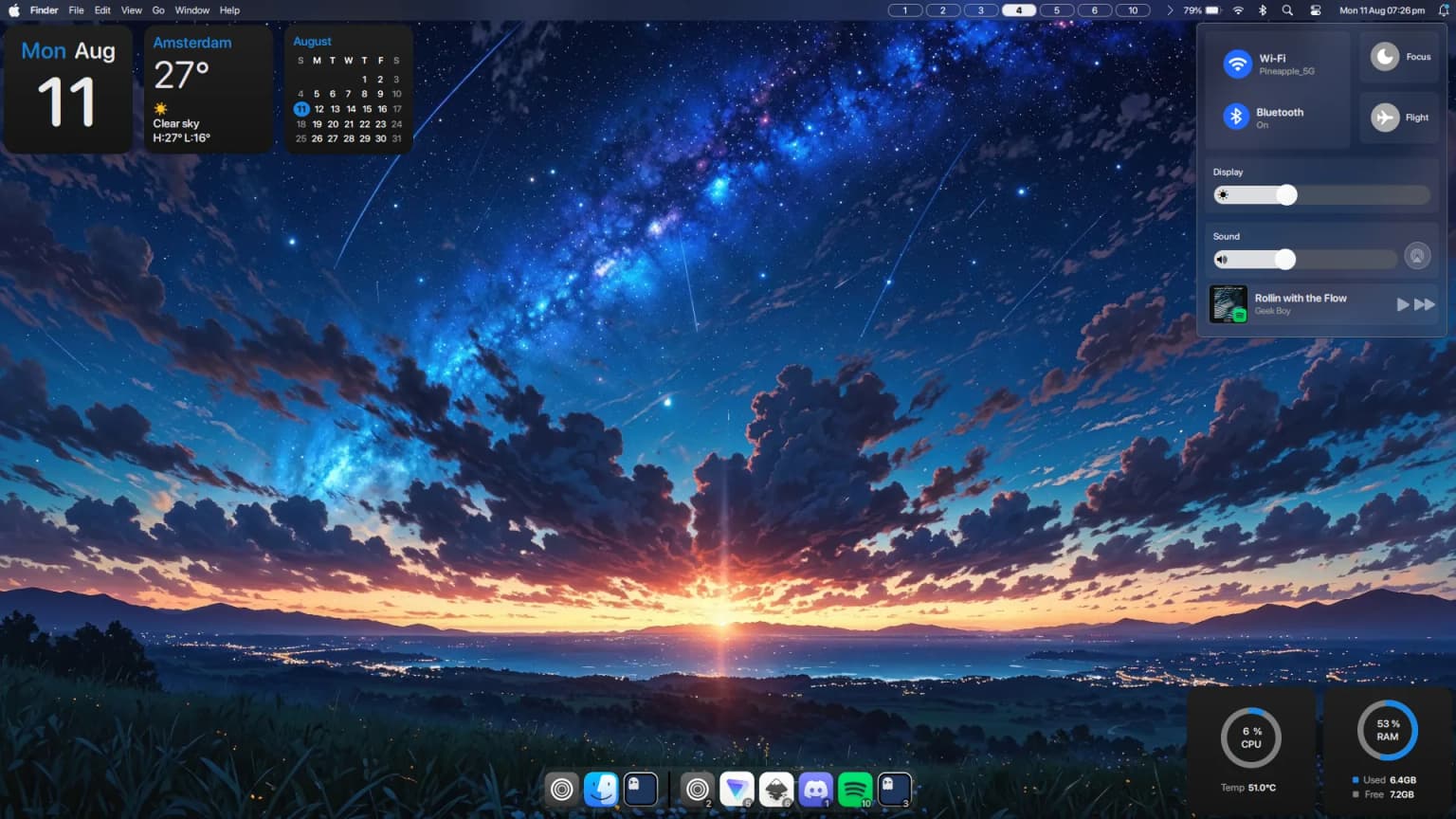
I started on the macOS concept right away, to see if Python and Fabric could produce the smooth animations, blur, and clean layout. After a few intense days, the first iteration was ready. tr1xem loved it and jumped in to write code.
We built it together over a full month. Wayland layer shells and GTK CSS threw constant curveballs: structuring the code, managing state across widgets, keeping the UI responsive without draining resources. We debugged, refined, and eventually shipped the complete macOS version of Modus.
The Great Rewrite
After four to five months past the initial release, the codebase had grown fast and become hard to maintain and scale. It needed a stronger foundation, so I decided on a complete rewrite.
This rewrite is solo. tr1xem moved on to xmonad, so it’s all on me. Challenging, and worth it.
Performance has been the main focus. I’m hunting down the memory leaks that plagued earlier versions; Python UI apps leak easily through circular references and GTK bindings. I also introduced a modular folder structure that makes the code easier to navigate for new contributors.
What’s New
- Migration to Virtual Environments: Moved from global installations to a
uv-managed Python virtual environment, speeding up dependency management and keeping the system stable. - Auto Reloading: The shell auto-reloads when
config.tomlchanges, so no restarts needed. - Mac-like Dock Magnification: Raw GTK drawing for smooth magnification, replicating the macOS dock feel.
- New Settings and OSD: A dedicated Settings app and new On Screen Display components.
- Global Menu Support: Global menu that natively supports Qt and GTK applications. For Electron apps, launch with
ELECTRON_ARGS="" appname --ozone-platform=x11to show menus in the panel. - Screencapture Tool: A built-in screenshot tool.
- Improved Configuration: TOML-based configuration. You can also hide specific tray items directly in
config.toml. - Debloating: Removed bloated launcher plugins and deprecated
glace-git. - Polished UI: Refined the overall styling and the control center’s player module.
- Critical Bug Fixes: Fixed the memory leaks, updated the project folder structure, and fixed the About app showing unknown data.
- Desktop Widgets: Drop a
.pyinconfig/desktop/and it renders live; drag widgets anywhere in edit mode and positions save todesktop.toml. - Spotlight Plugins: Drop a
.pyinconfig/plugins/; keywords, global search, per-plugin venvs, and hot reload viadeep_reload.
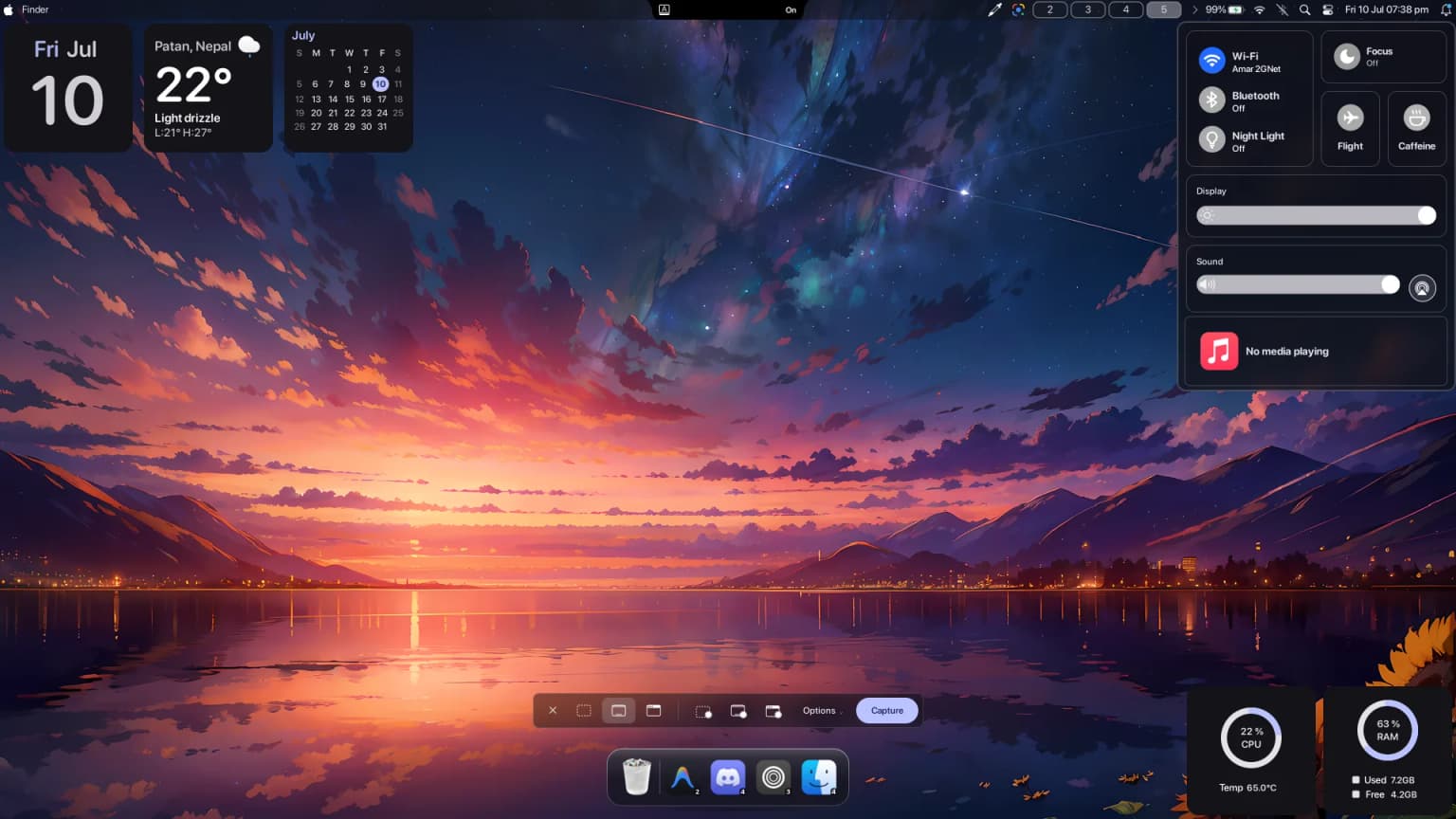
Users can add custom buttons to the panel by editing a mods.toml file. No Python, no source diving. Define a button, its icon, and its command in text, and it appears on the desktop.
How the Mods System Works
Open the config file and define new behaviors in plain text. A quick example:
[mods]
enable = true

[[button]]
icon = "firefox"
command = "firefox"
tooltip = "Open Web Browser"

[[button]]
icon = "terminal"
command = "kitty"
tooltip = "Open Terminal"Whether you need a bash script, an app shortcut, or a custom system toggle, the panel adapts to you.
Desktop Widgets
Drop a .py file in config/desktop/ and it’s on your screen. No restart, no registry file to hunt down. Each widget calls DesktopWidgetRegistry.register() with a unique key, a size, and a default position; Modus scans the folder on startup, and a file watcher picks up changes while it runs. Delete the file and the widget is gone within two seconds.
Right-click the desktop, choose Edit Widgets, drag anything anywhere, then right-click → Done Edit. Positions save to config/desktop.toml. Or edit the px/py fractions there directly.
It ships with a clock, weather, a calendar, and CPU and RAM readouts. Your widgets get the same treatment: the name= you pass maps to a CSS id, so a widget styles like the rest of the shell.
The widget window uses a partial input region. Only the rectangles that widgets actually occupy take pointer and keyboard input, so Hyprland keybinds keep working and right-clicks on empty desktop pass through to the windows below.
Spotlight Plugins
Spotlight (Super + D) now loads third-party plugins. Drop a .py in config/plugins/ and it appears on the next start; fabric-cli exec modus1 'deep_reload hello' swaps it in live while you develop, no Modus restart.
A plugin is a SpotlightPlugin subclass with a search() method that returns SearchResults. Give it keywords, and a user types gg <query> to route straight to it; set searchable = True and it competes in global search alongside apps, the calculator, and the emoji picker. The spotlight cancels stale searches as you type, so search() gets a token and you check is_cancelled before expensive work instead of burning CPU on dead queries.
Plugins that need third-party packages drop a requirements.txt next to the file, and Modus installs them into a per-plugin venv with uv at load time. The weather example does this: ask by keyword (wth london) or by plain search.
A Custom Alt-Tab Switcher
A macOS-like shell needs the centered app switcher, and Hyprland’s built-in Alt-Tab isn’t pretty, so Modus ships its own ApplicationSwitcher.
Triggered, it fades to center screen and grabs keyboard focus. It queries the compositor for active clients, filters hidden windows and special workspaces, and renders large app icons with workspace badges, like macOS.
You navigate with Tab, arrow keys, or Vim-style h and l bindings, and you can close a rogue app with Delete or Backspace without focusing the window first.
The Dynamic Notch
The Dynamic Notch brings contextual information into the middle of the panel. It’s a GTK Stack managing transient and persistent states.
Toggle Caps Lock, mute your microphone, plug in a charger, or switch keyboard layouts, and an indicator slides into the notch for two seconds, then hides.
For persistent states, screen recording or music for example, it stays open with a recording timer or MPRIS media controls. With several persistent states at once, scrolling over the notch cycles through the active widgets.
The macOS-style Screen Capture
Screenshots and recordings on Linux usually mean stringing CLI tools together. Modus ships an integrated macOS-style Screen Capture utility instead.
Trigger it and a floating toolbar appears at the bottom of the screen, like Cmd+Shift+5 on a Mac. Capture the full screen, a window, or a custom region, as a screenshot or recording.
An options menu toggles the cursor, mikes in for video, and sets a capture delay. The whole interface is keyboard navigable, so you can jump between tools with number keys and capture without the mouse.
The macOS-like Dock Magnification
Most Linux docks scale with GTK CSS, which looks jittery, or lean on heavy external compositors. Modus does it differently: a custom GTK DrawingArea (canvas.py) does the magnification from scratch with raw Cairo. Instead of GTK’s layout engine, the dock measures the pointer distance to every icon and interpolates each scale factor.
The cost is high. Since it bypasses CSS, every hover frame wipes the canvas and repaints icons, backgrounds, workspace badges, and separators from scratch in Python. To keep CPU low I built a _pixbuf_cache that holds raw image buffers in memory, plus an animation loop that only queues canvas paints when the pointer moves inside the icons’ bounding box.
The Global Menu
The Global Menu was the most requested feature, and the hardest to build. Linux apps are wildly inconsistent at exporting menus.
Supporting it took a 1000+ line Python service (globalmenu.py) that acts as a persistent, event-driven importer. It connects to D-Bus and tries multiple strategies to find app menus: the standard Canonical AppMenu Registrar first, then deep D-Bus introspection for com.canonical.dbusmenu, then org.gtk.Menus, and finally org.gtk.Actions as a last resort.
Finding the D-Bus service that matches the active window’s PID is a nightmare. The service polls hyprctl activewindow for the focused window’s PID and wm_class (“firefox”, “discord”), generates dozens of potential D-Bus paths across KDE, GNOME, XFCE, and more. If nothing matches, it runs a Depth-First Search over raw D-Bus nodes hunting for any interface that looks like a menu.
D-Bus roundtrips are slow and can freeze the shell, so I built a cache for XML introspection responses and ran the whole thing on multithreading, listening to NameOwnerChanged signals so apps opening and closing don’t lock up the UI thread.
When a menu is found, the data is still a mess. Three Linux menu standards meant three client classes (DBusMenuClient, GtkMenuClient, ActionMenuClient) to parse them into one structure the panel can render.
It works well for Qt and GTK apps now, but the lack of standardization makes the global menu one of the hardest parts of the project. Every desktop environment does it differently, and unifying them under one panel was a lot of work.
Special Thanks
Even when the code is solo, the project isn’t. Thanks to these people for code snippets, help, and ideas:
- darsh for creating Fabric, which made everything possible.
- tr1xem for kicking off the macOS conversation and staying on as a collaborator: fixing bugs, building widgets, trading ideas, and the constant support and motivation that kept the project alive.
- muhchaudhary (gummy bear album) for code snippets that saved me time.
- Axenide for the config that inspired parts of mine and some gems I couldn’t resist borrowing.
- E3nviction for helpful code snippets and ideas.
What’s Next
Modus went from an AGS replication experiment to a collaborative project with a community of developers and users. Thanks to everyone who contributed, tested, or used it over the past few months.
Why Python and Fabric
Look at the ricing ecosystem and you’ll see tools like AGS (JavaScript/GJS, now astal), eww (its own yuck language and Rust), or quickshell. People ask why I chose Python and Fabric instead.
Partly timing, partly simplicity. When I started with Fabric, quickshell didn’t exist; it launched months after our macOS version. Python let me prototype new widgets without fighting build systems. Fabric’s GTK bindings bring native Linux desktop tech with Python’s ease.
During rewrite planning I briefly considered quickshell, which was available by then. It’s a great project, but its CPU and memory usage pushed me away. Python and Fabric keep resource use low while giving access to a rich ecosystem: weather, there’s a library; MPRIS media control, a few lines. That extensibility is what makes Modus powerful.
The Modular Architecture
The great rewrite taught me the value of modular architecture. Early Modus tied the panel, launcher, and notifications together, so updating one often broke another.
Now the modules are independent. Skip the Modus launcher and use rofi or wofi. Swap in a different notification daemon. That keeps the codebase clean to maintain and matches Linux’s freedom of choice: run only what you need, keep the system light. The next major release is on the way.